



If there is one software that has defined the modern photographer’s workflow, it is Adobe Lightroom. Officially launched in 2007, it has become the reference tool for organizing, developing, and sharing images.
But how did this project, born in the shadow of Photoshop, end up becoming the nerve center for millions of creatives? From its origins under the code name “Shadowland” to its current hegemony in the Cloud, let’s look back at the history and stakes of the Adobe giant.
Project "Shadowland": The Genesis of a Revolution
In the early 2000s, photographers had only one option: Photoshop. Powerful, yes, but complex and ill-suited for processing large quantities of images.
In 1999, Mark Hamburg, a developer at Adobe, launched a secret project named “Shadowland”. His idea? To create a fluid tool, based on the Lua language, dedicated exclusively to the needs of photographers, without the heavy graphic design features of Photoshop. Unique for the time: Adobe launched a public beta in 2006 (first on Mac), allowing more than 500,000 photographers to co-construct the software before its official release on February 19, 2007.

The Lightroom Philosophy: "Non-Destructive"
The great strength of Lightroom, which distinguished it from Photoshop right from the start, is its non-destructive approach.
- In Photoshop: You modify pixels. To undo, you have to go back in history or have saved a copy. It is heavy and destructive.
- In Lightroom: You modify instructions. The software saves your settings (exposure +1, contrast +10) in a catalog, without ever touching the original file (RAW or JPEG). You can return to the initial state years later, in a single click.
This architecture makes it possible to process thousands of photos without duplicating heavy files, saving considerable storage space.

The Current Ecosystem: Classic vs. CC
The major evolution (and sometimes source of confusion) took place in 2015 with the shift to Creative Cloud and the abandonment of the perpetual license (“boxed version”). Today, the offering is split into two distinct software programs included in the subscription — a separation often summarized as Lightroom CC vs Classic:
Lightroom Classic (The "Real" Lightroom)
This is the direct descendant of the original software. It is installed on your computer and stores photos on your local hard drives. It is the most powerful version, favored by professionals for its printing tools, geolocation, and precise folder management.
Lightroom (formerly CC)
Why is it the Leader?
Beyond editing, Lightroom is primarily a management tool (DAM – Digital Asset Management).
- Powerful Cataloging: Hierarchical keywords, star ratings, flags, smart collections… Finding a specific photo among 100,000 images takes just a few seconds.
- Time Saving: Lightroom’s strength lies in batch processing. You can copy the settings of one photo and “paste” them onto 500 other images taken under the same conditions instantly.
- Adobe Sensei AI: The latest versions integrate automatic masks (selecting the sky, subject, or people) with formidable precision, drastically reducing masking time.
The Challenge of Multiple Catalogs: The Peakto Solution
Despite its power, Lightroom imposes a constraint: being locked inside its own catalog. However, many photographers use multiple hard drives, have scattered archives, or use other software in parallel (Capture One, Luminar, etc.). Lightroom does not allow you to see all of this simultaneously.
This is where Peakto becomes the essential complement.
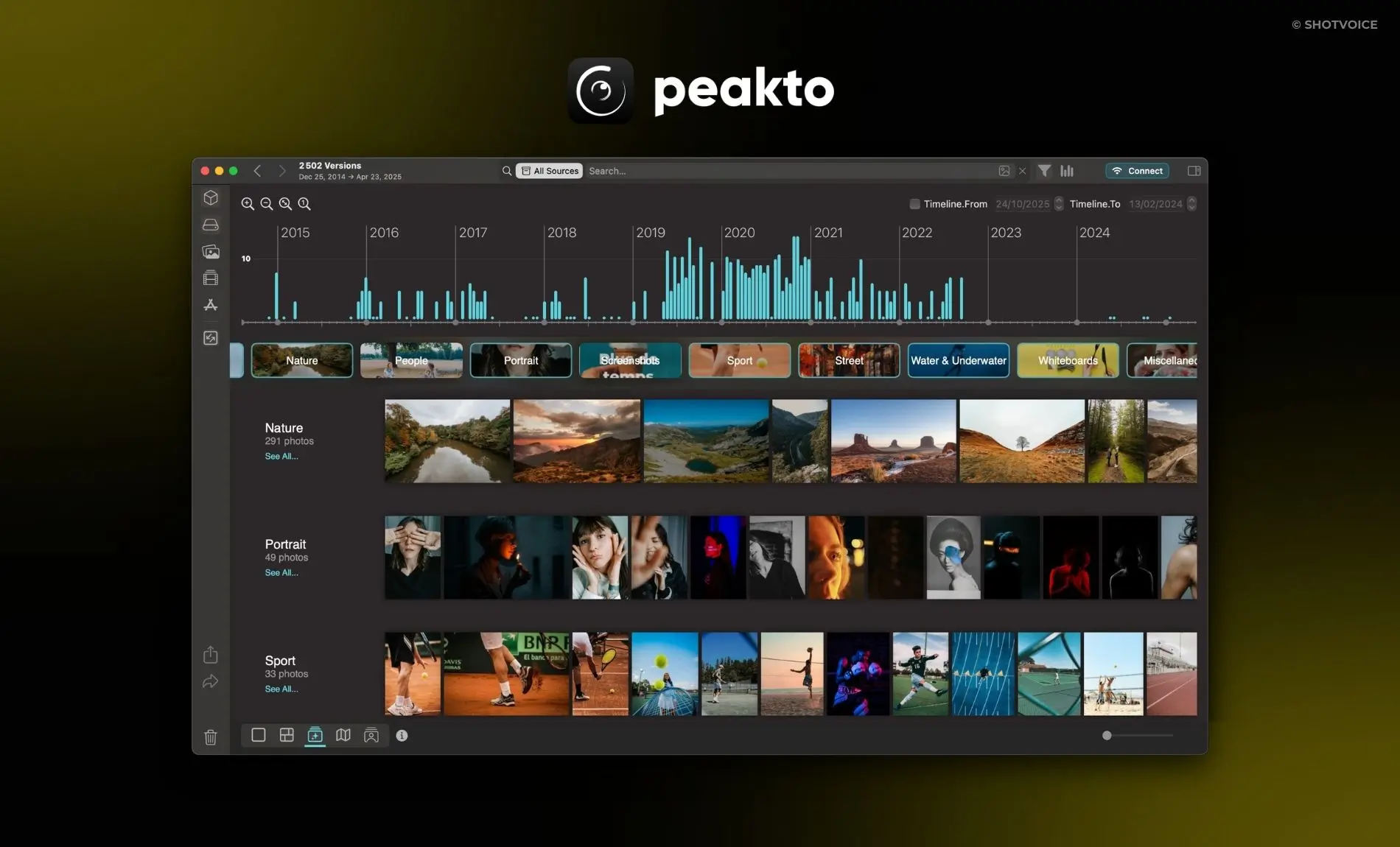
Peakto: Unifying Your Entire Digital Life
Peakto acts as a universal control tower capable of seeing beyond the Adobe ecosystem:
- A Global and Universal View: Peakto centralizes everything. It displays your Lightroom catalogs in a single interface, but also your Capture One libraries, Apple Photos, as well as all image folders scattered across your different hard drives.
- Centralized Search: No need to ask yourself “Which drive is this photo on?”. Peakto’s AI finds your images instantly, whether they are managed by Adobe or simply stored in a forgotten folder.
- Visual History: Peakto respects your work. It displays the modified versions of your Lightroom photos while giving you access to original files located elsewhere.
In short, if Lightroom is the perfect production tool, Peakto is the ultimate supervision tool to never lose track of your archives, regardless of their location or the software used.
Lightroom: The Backbone of Modern Photography
From a simple alternative to Photoshop, Lightroom has become the backbone of digital photography. Whether used for its fluid Cloud or its “Classic” cataloging power, it remains unavoidable. By associating it with a universal organization solution like Peakto, the modern photographer finally has a complete workflow, breaking down the barriers between images for total freedom.